What Are the Top Ergonomic Workplace Products in 2026?
In 2026, an ergonomic workplace is no longer defined by one expensive chair. It is a coordinated environment that supports movement, visibility, comfort, and focused work. Adjustable desks, supportive chairs, monitor arms, split keyboards, vertical mice, footrests, and glare-controlled lighting now compete for attention. The best choice depends on the worker, task, body dimensions, and available space.
Alan Hedge, the late Cornell University ergonomics professor, often used a practical reminder: “The best posture is the next posture.” That idea shapes this guide. A sit-stand desk cannot correct a poorly positioned monitor. A premium chair cannot compensate for an unchanged posture all day. Small details matter, such as keeping the screen near eye level, placing the mouse close to the keyboard, and allowing both feet to rest securely.
Real workplaces are rarely perfect. Some desks wobble, budgets remain limited, and remote workers may use kitchen tables. That reality deserves attention. Product testing should consider adjustment range, durability, repairability, warranty support, and daily usability, not only appearance. A product can look advanced yet create new pressure points. Personal experience also matters. One worker may prefer a firm seat, while another needs softer cushioning or more lumbar adjustment.
This article examines the leading ergonomic workplace products for 2026. It compares their practical benefits, limitations, and ideal users. The goal is not to promote a universal solution. It is to help readers build a safer, more adaptable workspace through informed decisions and regular reassessment.
Defining Ergonomic Workplace Products and Their Core Benefits
What Are the Top Ergonomic Workplace Products in 2026?
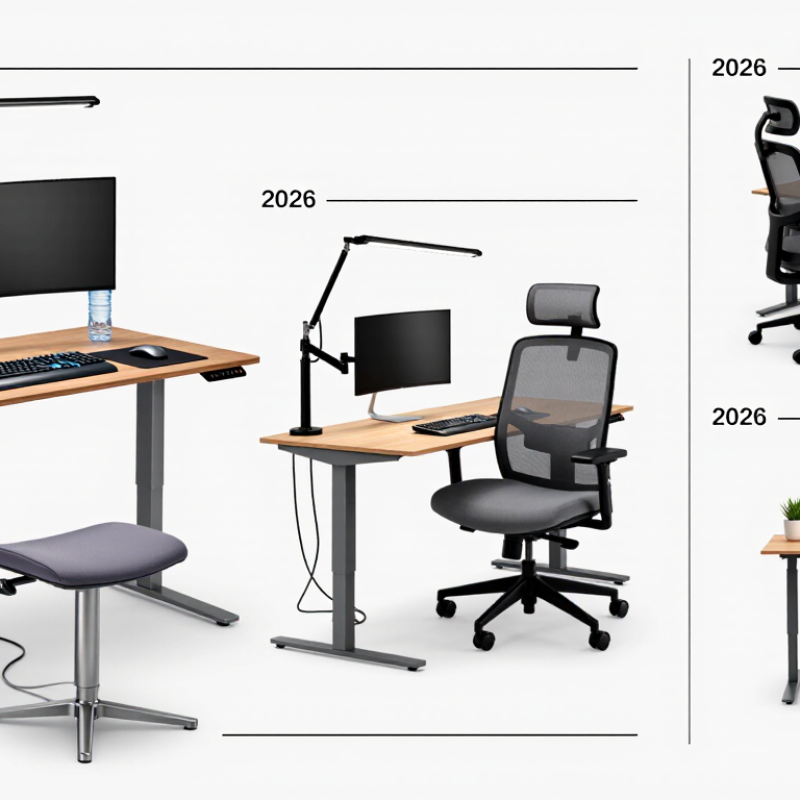
Ergonomic workplace products are tools designed to support neutral posture, comfortable movement, and lower physical strain. They include adjustable chairs, sit-stand desks, monitor arms, split keyboards, vertical mice, footrests, and task lighting. The best choices fit the worker, not just the office. A chair with adjustable seat depth can support shorter legs, while a monitor arm can place the screen near eye level. Small adjustments matter.
Their core benefits include reduced neck tension, better wrist alignment, and easier movement during long work sessions. An adjustable desk may encourage regular position changes, but it cannot replace breaks or good habits. That is an important limitation. In practical workplace assessments, comfort often improves when several products work together. However, results differ by body size, task type, and existing discomfort. “Ergonomic” is not a guarantee of perfect support.
Tips: Keep the top of your screen near eye level. Place your feet firmly on the floor or a footrest. Keep elbows close to your body, with relaxed shoulders. Change position every 30 to 60 minutes. Test one product before changing your entire workstation. A softer chair is not always better. If pain continues, seek advice from a qualified health professional.
Key Features of an Ergonomic Desk and Office Setup
An ergonomic desk begins with fit, not decoration. The chair should support the lower back while allowing both feet to rest flat on the floor. Keep elbows near the body, bent around 90 degrees. The desk should leave enough clearance for relaxed knees and changing leg positions. A monitor belongs roughly an arm’s length away, with its top near eye level. That small adjustment can reduce repeated neck bending during long work sessions.
According to the U.S. Bureau of Labor Statistics, musculoskeletal disorders represented 27% of nonfatal workplace injuries involving days away from work in 2023. The figure supports practical prevention, not fear. OSHA recommends neutral wrist positions, suitable screen placement, and regular changes in posture. A keyboard and mouse should sit close enough to prevent reaching. A document holder can also reduce constant downward glances. Keep frequently used items within easy reach.
Movement matters more than a rigid “perfect” position. The National Institute for Occupational Safety and Health emphasizes reducing awkward postures, force, and repetition. A sit-stand desk helps only when workers actually alternate positions. I still catch myself leaning toward the screen. That is useful feedback. A short walking break, a timer, or a simple stretch can reset the workstation. Lighting needs attention too: place the screen away from direct glare, and use soft side lighting for paper documents. The best setup changes with the person, task, and time of day.
Top Ergonomic Chairs, Desks, and Computer Accessories in 2026
The best ergonomic workplace products in 2026 should support movement, not force one rigid posture. The World Health Organization reports that about 1.71 billion people live with musculoskeletal conditions worldwide. That figure makes everyday workstation design difficult to ignore.
An ergonomic chair needs adjustable seat depth, lumbar support, and armrests that keep shoulders relaxed. A firm seat is not automatically a healthy seat. Desk height also matters. A sit-stand desk can reduce long, uninterrupted sitting, but frequent position changes matter more than standing for hours. Keep the monitor directly ahead, with its top near eye level. OSHA’s computer workstation guidance supports this alignment. A compact keyboard, vertical mouse, or separate monitor can reduce awkward wrist and neck angles. Small changes often feel surprisingly effective.
EU-OSHA’s OSH Pulse survey found that 30% of European workers said work caused or worsened health problems. That number does not prove one product will solve discomfort. It does show why workplace adjustments need evidence and personal testing. I still catch myself leaning toward the screen during concentrated tasks. The setup is imperfect. Measure desk height, notice pressure points, and adjust gradually. A footrest may help shorter users, while taller users may need more knee clearance. Accessories should fit the person, not merely complete a fashionable workstation.
How to Choose Ergonomic Products for Different Work Environments
What Are the Top Ergonomic Workplace Products in 2026?
Choosing ergonomic products depends on the work environment, not fashion or price. A chair that suits an office may feel awkward in a small home workspace. Start by observing posture, reach, lighting, and movement during a normal workday. Your feet should rest flat, while your elbows stay close to your body. A height-adjustable desk, external keyboard, and monitor stand can reduce neck and shoulder strain. However, adjustment ranges matter more than product labels.
Open offices require compact products that support quick changes. A lightweight laptop stand and quiet keyboard can help during shared work. Home workers may need cable management, a supportive footrest, and better task lighting near a window. In workshops or standing environments, cushioned floor mats and supportive footwear may be more useful than a desk chair. Remote workers should also consider storage, because clutter often forces twisted postures. I once raised a monitor too high and created new discomfort. Good intentions can still produce poor results.
Tips: Measure your desk before buying anything. Test one change for several days. Ask whether discomfort improves, not whether the setup looks modern. Recheck screen height after changing your chair. If pain continues, consult a qualified healthcare professional. Record short observations, even imperfect ones. Small details often reveal the real problem.
How to Choose Ergonomic Products for Different Work Environments
The figures show the global scale of common musculoskeletal conditions and explain why adjustable ergonomic products remain important in offices, home workspaces, call centers, and hybrid workplaces. Choose products that support neutral posture, allow individual adjustment, and match the tasks performed throughout the workday.
Data source: World Health Organization, “Musculoskeletal health.” Figures represent people affected globally and overlap because some people experience more than one condition.
Evaluating Comfort, Adjustability, Safety, and Long-Term Value
In 2026, ergonomic workplace products should be judged by daily use, not impressive specifications. A supportive chair should keep hips level, allow easy reclining, and hold the lower back without pressure. Adjustable armrests matter when shoulders begin rising during long typing sessions. I have occasionally overvalued clever features and ignored a simple height mismatch. Fit comes first. Comfort is personal.
A height-adjustable desk can reduce prolonged sitting, but movement remains the real safeguard. Alternate standing and sitting gradually, especially if your legs are untrained. A stable surface should not wobble when a monitor or notebook is moved. Keyboard trays, monitor risers, and footrests deserve the same scrutiny as chairs.
Poorly placed equipment can twist the neck or overload the wrists. Safety includes rounded edges, secure bases, dependable locking mechanisms, and cables kept away from walking paths. Measure twice.
Long-term value depends on durable materials, repairable parts, clear instructions, and reliable warranty support. A cheaper product may become costly if padding collapses or adjustment controls fail within months. Look for replaceable components and accessible service information before buying. Independent safety testing can strengthen confidence, yet no certificate guarantees personal comfort. Bodies differ, and expert guidance still needs practical adjustment. One uncomfortable week should prompt review, not stubborn loyalty. A desk setup may look balanced while your wrist quietly disagrees.